Chunking: The Decision That Makes or Breaks Your RAG System
Most teams building retrieval-augmented generation (RAG) systems obsess over embedding models, vector databases, and LLM choice. They overlook the step that happens before all of it — chunking. Get chunking wrong and none of the rest matters. Get it right and even a modest embedding model can return surprisingly good results.
This post explains what chunking is, why it matters, when to use it, and how to choose the right strategy for your use case.
What Is Chunking?
Chunking is the process of splitting a large document into smaller pieces — called chunks — before embedding them and storing them in a vector database.
Here’s why that’s necessary. Large language models have a fixed context window. You can’t feed an entire 200-page PDF into a retrieval system and expect it to find the three relevant sentences buried on page 147. Instead, you split the document into manageable pieces, embed each piece as a vector, and at query time retrieve only the chunks most relevant to the question.
A chunk is just a fragment of text with enough context to be meaningful on its own.
Concrete example: Take a 200-page employee handbook. Someone asks: “How many days of paid leave do I get?”
Without chunking, the entire handbook gets embedded as one giant vector — representing leave policy, expense claims, code of conduct, IT setup, and parking rules all at once. The embedding is so diluted it matches everything and nothing. The retrieval system either returns the whole document or misses the relevant section entirely.
With chunking, the handbook is split into ~400-token pieces. One chunk contains exactly this:
“Full-time employees are entitled to 20 days of paid annual leave per calendar year. Leave accrues at 1.67 days per month. Unused leave up to 10 days may be carried over to the following year.”
That chunk gets embedded independently. Its vector points precisely at “employee leave entitlements.” When the user asks about paid leave, this chunk scores highest in similarity. The LLM reads 400 tokens instead of 200 pages and gives a precise answer.
This is what chunking actually does:
- Makes retrieval possible — you can’t vector-search a 200-page document, but you can search 400-token pieces of it
- Makes embeddings precise — a chunk about leave policy produces a vector that means “leave policy”, not “everything in this company”
- Makes LLM context efficient — the LLM reads the one relevant chunk, not the whole document
[VISUAL 0] Show a 200-page handbook on the left. An arrow splits it into small labeled chunks in the middle. A query “how many days of paid leave?” on the right matches only the relevant chunk, which feeds into the LLM for a precise answer.
Why Does Chunking Matter?
Consider a knowledge base with 10,000 documents — product manuals, legal contracts, internal wikis. A user asks: “What is the return policy for international orders?”
If your chunks are well-constructed, the retrieval system surfaces a tight 300-token passage from the returns policy page. The LLM reads it and gives a precise answer.
If your chunks are poorly constructed — say, a 2,000-token blob that mixes the returns policy with shipping logistics and payment terms — the embedding becomes semantically diluted. The retrieval system either misses it or retrieves it but buries the relevant sentence in noise. The LLM hedges, hallucinates, or gives a partially wrong answer.
Poor chunking is one of the most common reasons production RAG fails — not because of bad models, but because of bad inputs to those models.
The Core Trade-off
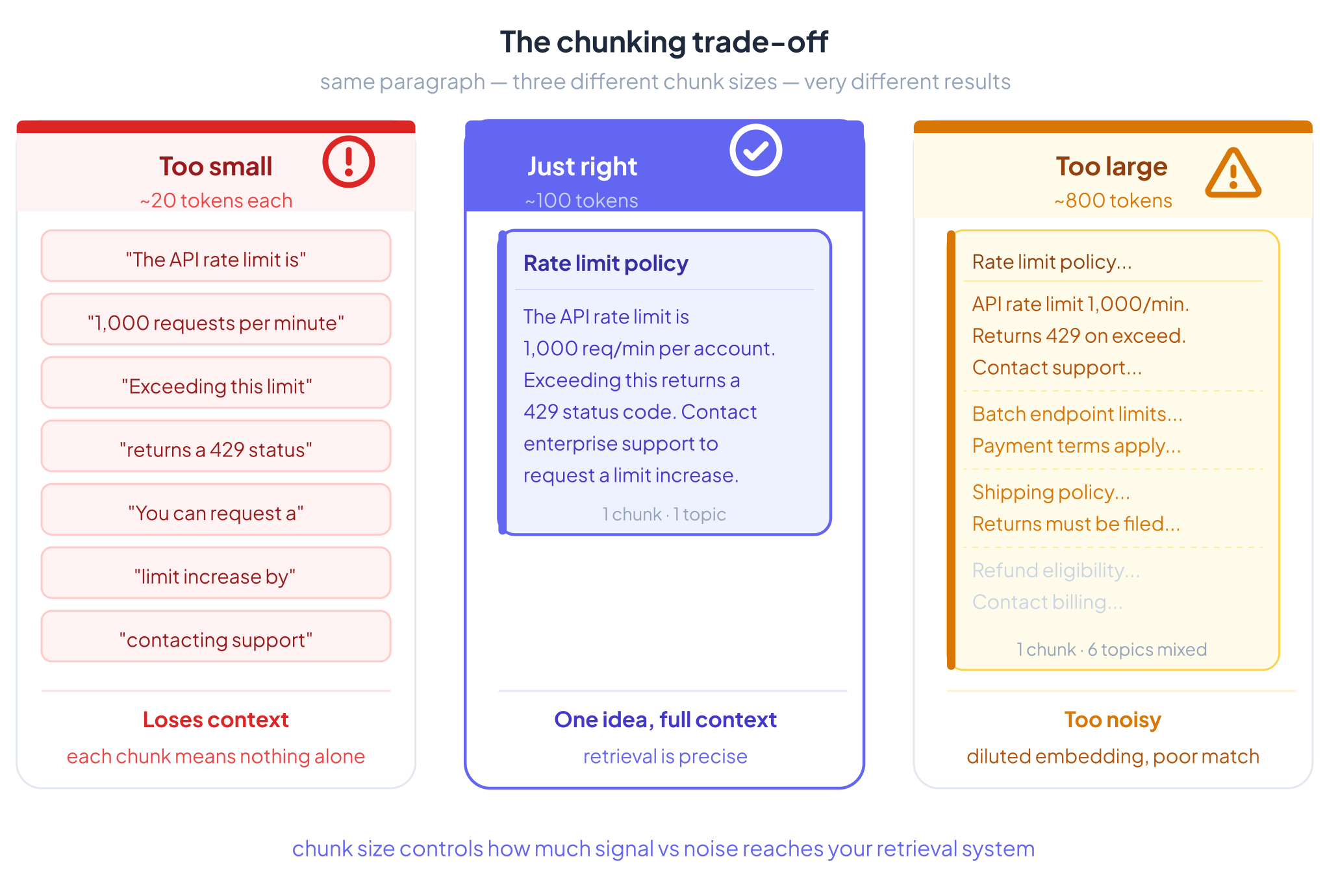
Too small: Chunks lose context. A sentence in isolation often means nothing without the sentences around it. Embeddings become incoherent.
Too large: Chunks become noisy. The embedding represents too many ideas at once, so it matches too broadly and retrieval precision drops. Cost goes up. Relevance goes down.
The goal is chunks that are semantically coherent — one idea, one topic, enough context to stand alone.
A Concrete Example
Take this paragraph from a technical document:
“The API rate limit is 1,000 requests per minute per account. Exceeding this limit returns a 429 status code. You can request a limit increase by contacting enterprise support. Batch endpoints are subject to separate limits documented in the batch processing guide.”
Fixed-size chunking at 50 tokens might cut it here:
Chunk A: “The API rate limit is 1,000 requests per minute per account. Exceeding this limit returns a 429 status code. You can request a limit increase” Chunk B: “by contacting enterprise support. Batch endpoints are subject to separate limits documented in the batch processing guide.”
Chunk B is now nearly meaningless without Chunk A. A query like “how do I raise my rate limit?” might retrieve Chunk B — which starts mid-sentence — and the LLM gets an incomplete, confusing passage.
Semantic chunking would keep the entire paragraph as one chunk, because all four sentences are about the same topic: API rate limits. The embedding captures the full concept. Retrieval works cleanly.
[VISUAL 2] Side-by-side comparison: left shows fixed-size cut mid-sentence with the broken boundary highlighted in red; right shows semantic chunk keeping all four sentences together with a clean boundary.
When Should You Chunk?
Chunk when:
- Your documents are longer than what comfortably fits in the LLM’s context window
- You have a large corpus where retrieving everything every time is too slow or expensive
- Your documents cover multiple distinct topics and you want topic-level retrieval precision
- You’re building a production RAG system where retrieval quality matters
Skip chunking when:
- Documents are short and self-contained (a single FAQ entry, a one-paragraph product description)
- Everything fits in the LLM’s context window and latency isn’t a concern
- Each document covers exactly one focused concept — chunking would only fragment it
- Speed matters more than retrieval precision
When documents are already atomic and coherent, chunking can actively hurt. You split something that was working fine and introduce artificial boundaries that confuse the retrieval system.
Chunking Strategies
There’s no universal best strategy. The right choice depends on your document types, query patterns, and performance budget.
[VISUAL 3] Strategy selection flowchart: starts with document type and query needs, branches through complexity/cost tolerance, arrives at recommended strategy. Covers all 8 strategies.
1. Fixed-Size Chunking
Split by a fixed token or character count, regardless of content.
Example: Every 400 tokens, start a new chunk. Add 50 tokens of overlap between chunks to reduce boundary losses.
Best for: Prototypes, uniform plain text, situations where simplicity matters more than precision.
Limitation: Semantically blind. It will cut sentences, split arguments, and separate questions from their answers.
[VISUAL 4] Token window sliding over a paragraph, showing fixed-size boundaries cutting mid-sentence. Highlight the overlap region between Chunk A and Chunk B.
2. Recursive Chunking
Split using a hierarchy of separators: try paragraph breaks first, then sentence breaks, then word breaks. Stop when chunks are within the target size.
Example: LangChain’s RecursiveCharacterTextSplitter tries \n\n, then \n, then . , then . This keeps paragraphs intact when possible and only falls back to finer splits when needed.
Best for: Articles, markdown, books, general-purpose text. This is the right default for most teams.
Limitation: Still structural, not semantic. Doesn’t understand topic shifts within a paragraph.
[VISUAL 5] Hierarchy tree showing separator fallback: paragraph break → sentence break → word break. Show a real text block being divided at each level.
3. Document-Based Chunking
Use the document’s own structure — headers, HTML tags, section markers, table boundaries — as natural chunk boundaries.
Example: A PDF report with headers like “Executive Summary,” “Financial Results,” and “Risk Factors” gets split at each header. Each section becomes one chunk, preserving the author’s intended structure.
Best for: PDFs, HTML pages, structured reports, anything with meaningful formatting.
Limitation: Requires a good parser. PDFs in particular are notoriously messy — columns, tables, and footers get scrambled by naive extraction. Always clean and parse before chunking.
4. Semantic Chunking
Embed sentences one by one and detect where the embedding shifts significantly — a topic change. Split at those boundaries.
Example: A Wikipedia article moves from discussing a person’s early life to their career to their controversies. Semantic chunking detects those shifts and creates separate chunks for each section, even if there’s no explicit header.
Best for: Knowledge bases, mixed-content documents, corpora where topic density varies.
Limitation: Compute-intensive. Embedding every sentence just to find boundaries is expensive at scale. Also sensitive to the threshold you set for “significant shift.”
[VISUAL 6] Line chart showing embedding similarity scores across sentences. Mark the dip points where similarity drops sharply — those are the split boundaries.
5. LLM-Based (Proposition) Chunking
Use an LLM to read the document and extract atomic propositions — discrete, self-contained factual statements — as individual chunks.
Example: The sentence “Einstein, who was born in Germany in 1879, developed the theory of relativity and later emigrated to the United States” might become three propositions: (1) Einstein was born in Germany in 1879. (2) Einstein developed the theory of relativity. (3) Einstein emigrated to the United States.
Best for: High-stakes retrieval where precision is critical — legal contracts, medical literature, compliance documentation.
Limitation: Expensive. Running an LLM over every document at ingestion doesn’t scale cheaply. Reserve for domains where quality justifies the cost.
6. Hierarchical Chunking
Index at multiple levels simultaneously: small chunks for precise retrieval, larger parent chunks for context-rich injection into the LLM.
Example: A technical manual is split into 100-token chunks for retrieval. When a small chunk is retrieved, the system injects its full parent section (500 tokens) into the LLM context instead. Retrieval is precise; the LLM gets full context.
Best for: Large structured documents — employee handbooks, government regulations, software documentation — where both summary-level and detail-level retrieval matter.
Limitation: More storage, more indexing complexity. Worth it for large corpora with deep hierarchical structure.
[VISUAL 7] Nesting diagram: document → sections (parent chunks) → paragraphs (child chunks). Show retrieval hitting a child chunk, then the parent being injected into the LLM context.
7. Agentic Chunking
An AI agent reads each document and decides how to split it based on meaning, structure, and content type — rather than applying a fixed rule.
Example: Given a regulatory filing, the agent identifies that sections 1–3 are boilerplate, section 4 contains the material obligations, and section 5 is a table of penalties. It chunks accordingly: skipping boilerplate, chunking section 4 by clause, and treating section 5 as a structured unit. A different document type would get a different treatment.
Best for: Complex, nuanced corpora where no single strategy fits — regulatory filings, multi-section contracts, corporate policies with mixed content types.
Limitation: Highest cost and complexity. Running an agent over every document at ingestion is expensive. Only justified when document variability is high and retrieval quality is critical.
8. Late Chunking
Rather than chunking before embedding, Late Chunking (introduced by Jina AI) embeds the entire document first using a long-context model, then derives chunk-level embeddings by pooling the token embeddings within each chunk’s span.
Example: A 10,000-token case study is fed whole into a long-context embedding model. The model processes all tokens with full attention across the document. Then you pool the token embeddings for each 500-token window to get chunk vectors. Each chunk’s embedding carries awareness of the surrounding document — something impossible when chunks are embedded in isolation.
Best for: Use cases where chunks need awareness of the full document’s context — case studies, comprehensive manuals, long-form analysis reports where a sentence only makes sense in the context of the whole.
Limitation: Requires a long-context embedding model. The cost is at ingestion, not query time, so caching helps amortize it. More complex to implement than traditional pre-chunking pipelines.
[VISUAL 8] Two-lane diagram: top lane shows traditional flow (chunk → embed each chunk independently); bottom lane shows late chunking (embed full doc → pool token embeddings → derive chunk vectors). Highlight where context awareness is gained.
Pre-Chunking vs. Late Chunking: A Fundamental Choice
All strategies above except Late Chunking are pre-chunking: you split the document first, then embed each chunk independently. This is fast, simple, and works well in most cases. The problem is that each chunk is embedded in isolation — it has no awareness of what came before or after it. A sentence like “This clause supersedes all prior agreements” embedded alone loses the context of which clause and which agreements it refers to.
Late Chunking flips the order: embed first, chunk second. The full document is processed by a long-context model before any splitting occurs, so every token attends to every other token. Only after embedding do you derive chunk-level vectors by pooling. The result is chunks whose embeddings carry document-wide context.
The trade-off is practical: pre-chunking works with any embedding model and is easy to scale. Late Chunking requires a long-context embedding model, adds ingestion complexity, and is more expensive per document. For most teams, pre-chunking with a good strategy (recursive or semantic) is the right starting point. Late Chunking becomes worth evaluating when retrieval quality plateaus and context loss is the diagnosed cause.
[VISUAL 9] Side-by-side pipeline timelines: Pre-chunking on left (split → embed → store → retrieve); Late Chunking on right (embed full doc → pool → store → retrieve). Mark the embedding step in a different color to show where it moves.
Practical Rules of Thumb
- Default starting point: 300–500 tokens, 10–20% overlap
- Technical PDFs and specs: 600–800 tokens
- News and short articles: ~300 tokens
- Code: One function or class per chunk
- Legal and contracts: Semantic or LLM-based chunking
- Always add metadata: source, section, page number, hierarchy level — this enables filtered retrieval and improves answer attribution
- Always clean before chunking: PDF extraction artifacts, garbled tables, and OCR noise silently corrupt embeddings. Parse and clean first.
- Evaluate on real queries: Don’t tune chunk size on synthetic test questions. Use actual queries from your users.
Common Mistakes
Using one chunk size for everything. Different document types have different natural granularity. A single size is always wrong for some of your corpus.
Zero overlap. Cheap to add, expensive to omit. A missed boundary can silently drop a critical sentence.
Chunking before cleaning. Garbled parser output produces garbled embeddings. Always parse and clean first.
Ignoring document structure. A PDF with multi-column layout, tables, and footnotes needs a structure-aware parser, not naive text extraction.
Treating chunking as isolated. It interacts with everything downstream: embedding model, retrieval strategy, re-ranking, and how context is injected into the prompt. Optimize the whole pipeline, not just the chunk size.
Where to Start
Use RecursiveCharacterTextSplitter (LangChain or LlamaIndex) with 400 tokens and 15% overlap. Add metadata. Evaluate with Recall@K on a sample of real queries. Then experiment with semantic chunking or hierarchical chunking once you have a baseline.
The right chunking strategy is the one your evaluation metrics say is working — not the most sophisticated one, and not the default you forgot to change.
Implementing Chunking on AWS
AWS offers a full managed stack for RAG pipelines. You can go fully managed with Amazon Bedrock Knowledge Bases, or build a custom pipeline using individual services.
Option 1: Fully Managed — Amazon Bedrock Knowledge Bases
The fastest path. Bedrock Knowledge Bases handles ingestion, chunking, embedding, and storage end-to-end. You configure a data source (S3), choose a chunking strategy, pick an embedding model, and point it at a vector store. No chunking code to write.
Fixed-size chunking:
“chunkingConfiguration”: {
“chunkingStrategy”: “FIXED_SIZE”,
“fixedSizeChunkingConfiguration”: {
“maxTokens”: 400,
“overlapPercentage”: 15
}
}
Hierarchical chunking — Bedrock splits into parent and child chunks. Parent chunks provide context; child chunks are what gets embedded and retrieved.
“chunkingConfiguration”: {
“chunkingStrategy”: “HIERARCHICAL”,
“hierarchicalChunkingConfiguration”: {
“levelConfigurations”: [
{ “maxTokens”: 1500 },
{ “maxTokens”: 300 }
],
“overlapTokens”: 60
}
}
Semantic chunking — Bedrock uses an embedding model to detect topic boundaries. bufferSize controls how many surrounding sentences are considered; breakpointPercentileThreshold controls how sharp a topic shift must be to trigger a split.
“chunkingConfiguration”: {
“chunkingStrategy”: “SEMANTIC”,
“semanticChunkingConfiguration”: {
“maxTokens”: 300,
“bufferSize”: 0,
“breakpointPercentileThreshold”: 95
}
}
No chunking — Each document is one chunk. Use when documents are already short and self-contained.
Vector stores supported: Amazon OpenSearch Serverless, Amazon Aurora PostgreSQL (pgvector), Pinecone, MongoDB Atlas, Redis Enterprise.
Embedding models via Bedrock: Amazon Titan Embeddings, Cohere Embed.
For most teams starting on AWS, Bedrock Knowledge Bases with hierarchical or semantic chunking is the right default. It eliminates infrastructure management and integrates directly with Claude for generation and Bedrock Guardrails for safety.
[VISUAL 10] Architecture diagram: S3 → Bedrock Knowledge Bases (chunking + embedding inside the box) → Vector Store → Bedrock Claude. Label it “fully managed” and show no custom compute.
Option 2: Custom Pipeline on AWS
When you need strategies Bedrock doesn’t support natively — LLM-based proposition chunking, agentic chunking, late chunking, or custom document parsers — build your own pipeline.
Typical architecture:
S3 (raw documents)
→ Lambda / ECS (parse + clean + chunk)
→ Bedrock (embedding model)
→ OpenSearch Serverless or Aurora pgvector (vector store)
→ Lambda (retrieval + generation via Bedrock Claude)
Parsing with Amazon Textract — For PDFs with tables, columns, and forms, Textract returns structured output that you reassemble before chunking. Far cleaner than naive PDF text extraction.
import boto3
textract = boto3.client(‘textract’)
response = textract.detect_document_text(
Document={‘S3Object’: {‘Bucket’: ‘my-bucket’, ‘Name’: ‘document.pdf’}}
)
blocks = [b[‘Text’] for b in response[‘Blocks’] if b[‘BlockType’] == ‘LINE’]
clean_text = ‘\n’.join(blocks)
Recursive chunking with LangChain on Lambda/ECS:
from langchain.text_splitter import RecursiveCharacterTextSplitter
splitter = RecursiveCharacterTextSplitter(
chunk_size=400,
chunk_overlap=60,
separators=[“\n\n”, “\n”, “. “, ” “]
)
chunks = splitter.split_text(clean_text)
Embedding via Amazon Bedrock Titan:
import boto3, json
bedrock = boto3.client(‘bedrock-runtime’, region_name=’us-east-1′)
def embed(text):
response = bedrock.invoke_model(
modelId=’amazon.titan-embed-text-v2:0′,
body=json.dumps({“inputText”: text})
)
return json.loads(response[‘body’].read())[’embedding’]
embeddings = [embed(chunk) for chunk in chunks]
Storing in OpenSearch Serverless:
from opensearchpy import OpenSearch, RequestsHttpConnection
from requests_aws4auth import AWS4Auth
credentials = boto3.Session().get_credentials()
auth = AWS4Auth(credentials, region=’us-east-1′, service=’aoss’)
client = OpenSearch(
hosts=[{‘host’: ‘your-collection-endpoint’, ‘port’: 443}],
http_auth=auth,
use_ssl=True,
connection_class=RequestsHttpConnection
)
for i, (chunk, embedding) in enumerate(zip(chunks, embeddings)):
client.index(index=’chunks’, body={
‘text’: chunk,
’embedding’: embedding,
‘metadata’: {‘source’: ‘document.pdf’, ‘chunk_index’: i}
})
LLM-based proposition chunking with Bedrock Claude — For high-stakes documents, invoke Claude to extract atomic facts before indexing.
def proposition_chunk(text):
response = bedrock.invoke_model(
modelId=’anthropic.claude-3-5-sonnet-20241022-v2:0′,
body=json.dumps({
“anthropic_version”: “bedrock-2023-05-31”,
“max_tokens”: 1024,
“messages”: [{
“role”: “user”,
“content”: f”””Extract all atomic, self-contained factual propositions from the text below.
Each proposition should be a single sentence that makes sense on its own.
Return one proposition per line, no bullets or numbering.
Text:
{text}”””
}]
})
)
result = json.loads(response[‘body’].read())
return result[‘content’][0][‘text’].strip().split(‘\n’)
AWS Service Map
Need | AWS Service |
Document storage | Amazon S3 |
PDF parsing / OCR | Amazon Textract |
Fully managed RAG pipeline | Amazon Bedrock Knowledge Bases |
Embedding models | Bedrock (Titan Embeddings, Cohere Embed) |
LLM for generation / LLM chunking | Bedrock (Claude, Llama) |
Vector store — managed search | Amazon OpenSearch Serverless |
Vector store — relational | Aurora PostgreSQL + pgvector |
Compute for custom pipeline | AWS Lambda, ECS, Step Functions |
Chunking library | LangChain or LlamaIndex (on Lambda/ECS) |
Which Path to Choose
Start with Bedrock Knowledge Bases if you want a working pipeline quickly with minimal infrastructure. It covers fixed-size, hierarchical, and semantic chunking out of the box.
Move to a custom pipeline when you need Textract for complex PDFs, proposition-level LLM chunking, agentic strategies, or finer control over retrieval and re-ranking. The two can coexist — use Bedrock Knowledge Bases for straightforward document types and a custom Lambda/ECS pipeline for the complex ones.
[VISUAL 11] Architecture diagram: S3 → Textract → Lambda/ECS (chunk + clean) → Bedrock Titan (embed) → OpenSearch Serverless → Lambda (retrieve) → Bedrock Claude (generate). Label each service box with its AWS name.