Part 1: The Evolution of Agentic AI in 2026: From Basic Chatbots to Full Orchestrators (Visual Guide)
This is Part 1 in a 10-part series designed as a hands-on playbook for architects building production-grade agentic AI systems in 2026.
Part 1 — Evolution of Agentic AI ( This blog )
Part 2 — From Static DAGs to Dynamic Graphs **
Part 3 — The Agentic Contract **
Part 4 — Layered Memory Architecture **
Part 5 — Multi-Agent Orchestration **
Part 6 — Deterministic Boundaries & Verification **
Part 7 — Progressive Autonomy & Human-in-the-Loop **
Part 8 — Event-Driven Agents **
Part 9 — The FinOps of Autonomy **
Part 10 — EcoAgent Reference Architecture (Capstone) **
** To be released.
Introduction
In March 2026, agentic AI moved from buzzword to reality.
Teams are no longer just prompting LLMs — they’re building systems that reason, plan, use tools, and pursue goals autonomously, often as coordinated multi-agent setups.
The jump is massive:
- 2023–2024 = generative chat
- 2025 = RAG + basic agents
- 2026 = goal-directed agents + orchestrators that delegate, aggregate, and iterate until the job is done
In this visual guide, I’ve mapped the exact architectural progression most teams follow today, based on clean, step-by-step diagrams I created to clarify the journey:
- From basic chatbots (no retrieval, no tools)
- To RAG-enhanced responders
- To copilot-style suggesters
- To full autonomous agents with ReAct loops
- All the way to agentic orchestrators managing swarms of specialized agents
These visuals highlight the key layers — retrieval, live context (APIs, logs, MCP), tools, reasoning loops, planning, and global state — that turn passive AI into proactive, goal-achieving systems.
Whether you’re coding agents, designing enterprise stacks, or evaluating roadmaps, this breakdown shows how we got here and where things are heading in 2026.
Stage 1: The Basic Chatbot (No RAG)
The journey starts with the simplest form of AI interaction — the basic chatbot without any retrieval capabilities.
At this stage, the system relies entirely on the LLM’s pre-trained knowledge and the immediate user prompt. There’s no external memory, no search over documents, and no live data integration. Every response is generated from scratch based on what the model “knows” up to its last training cut-off.
How it works (diagram explanation):
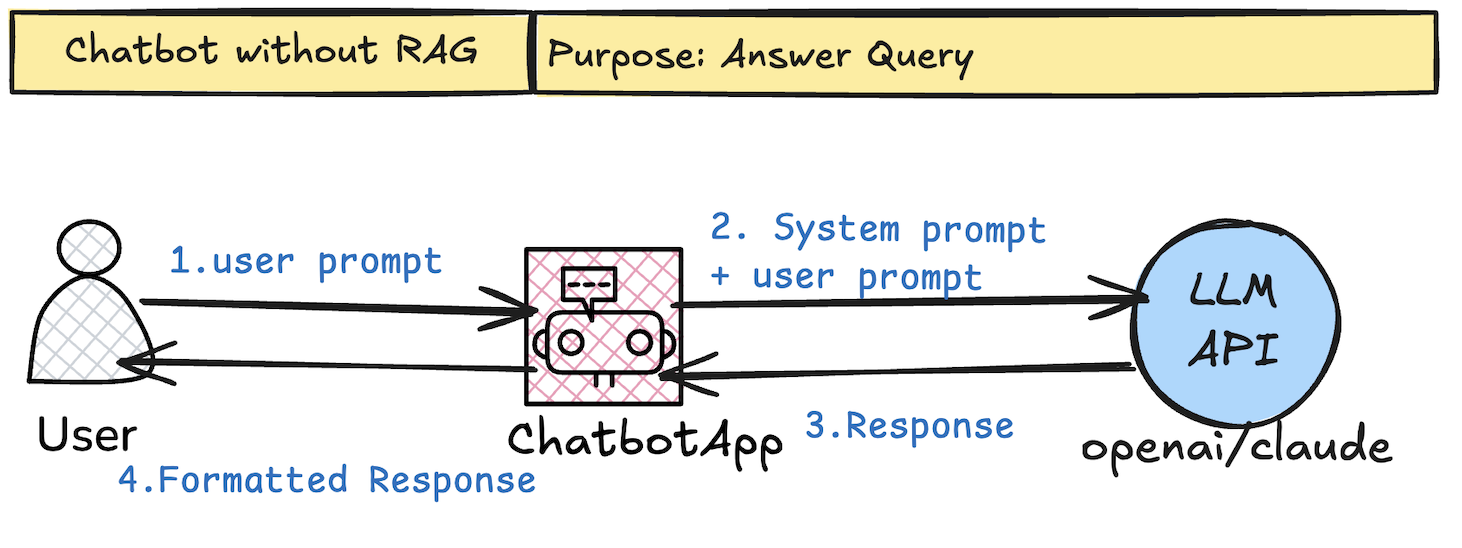
Key flow
- User prompt goes directly to the LLM API (e.g., via OpenAI/Claude).
- System prompt + user input = response.
- The chatbot app formats and displays it.
Strengths and Limitations
Aspect | Strengths | Limitations |
Speed | Very low latency, minimal cost | — |
Simplicity | Easy to build and maintain | No external knowledge or updates |
Reliability | Consistent on well-covered topics | High hallucination risk on recent / specific data |
Knowledge Scope | Good for general, timeless topics | Static cutoff; no proprietary / live data |
Use Cases | FAQs, casual chat, creative tasks | Useless for current events, internal docs, accuracy-critical work |
Stage 2: Chatbot with Retrieval-Augmented Generation (RAG)
RAG adds a retrieval step before generation, grounding the LLM in external documents instead of relying only on its training data.
How it works (diagram explanation):

Key flow:
- User query → embedding model creates vector
- Vector search → top-k relevant document chunks from vector DB
- Retrieved chunks injected into prompt as context
- LLM generates grounded response
Strengths and Limitations
Aspect | Strengths | Limitations |
Speed | Still fast (retrieval usually < 200 ms) | Slower than pure generation |
Accuracy | Drastically lower hallucinations on retrieved content | Can retrieve irrelevant / noisy chunks |
Knowledge Scope | Up-to-date, proprietary, internal docs possible | Limited to what’s indexed in the vector DB |
Cost | Moderate (embedding + vector search) | Indexing + storage + retrieval add cost |
Use Cases | Enterprise search, knowledge bases, support bots, legal/research Q&A | Struggles with complex multi-hop reasoning |
Stage 3: Copilot-Style Assistants
This stage shifts from pure question-answering to action suggestion.
The system observes the user’s context (live data, logs, APIs) and proposes next steps rather than just generating text.
How it works (diagram explanation):

Strengths and Limitations
Aspect | Strengths | Limitations |
Speed | Fast inference + quick context fetch | Still human-in-the-loop slows overall flow |
Autonomy | Suggests concrete actions | No autonomous execution |
Context Awareness | Sees real-time system state | Suggestions can be ignored or overridden |
Safety | Human approval reduces risk | Relies on user to catch bad suggestions |
Use Cases | Developer tools, IT ops, sales copilots, design assistants | Not suitable for fully unattended workflows |
This pattern exploded in 2023–2025 (GitHub Copilot, Microsoft 365 Copilot, etc.) because it balances capability with control. In 2026 it remains dominant wherever trust, compliance, or explainability matter more than full speed.
Stage 4: Copilot with RAG
This stage combines the action-suggestion power of a copilot with the grounded knowledge of RAG.
The system retrieves relevant documents and pulls live operational context, then suggests highly accurate, context-aware actions.
How it works (diagram explanation):
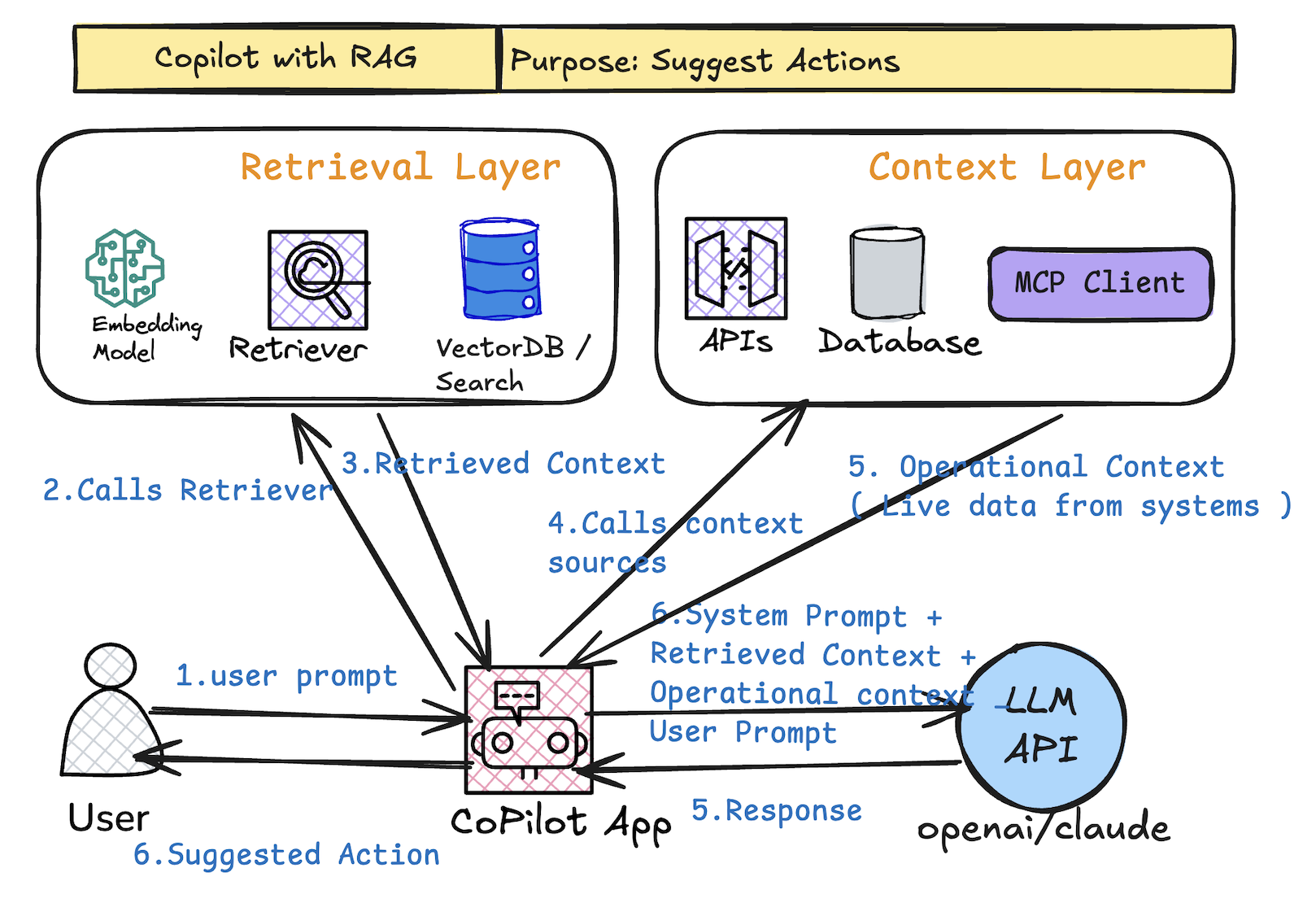
Key flow:
- User prompt → calls Retriever (embedding + vector DB → top-k chunks)
- Simultaneously pulls live context (APIs, logs, databases, MCP client)
- LLM receives: system prompt + retrieved chunks + operational context + user prompt
- Output = grounded, high-quality suggested actions
- Still human-in-the-loop (review/approve)
Strengths and Limitations
Aspect | Strengths | Limitations |
Accuracy | Very high — grounded in docs + live data | Still limited to indexed + accessible context |
Relevance | Suggestions match real system state + knowledge | Retrieval noise or stale context can mislead |
Context Richness | Combines static docs with dynamic/live signals | Higher latency from dual retrieval + context fetch |
Safety | Human approval + grounding reduces risk | No autonomous execution; depends on human oversight |
Use Cases | Advanced dev tools, enterprise ops, compliance-heavy workflows, complex troubleshooting | Not suited for unattended, high-volume automation |
By 2026 this hybrid is one of the most widely deployed patterns in production — it delivers the biggest practical value before crossing into full autonomy. Many teams stop here because it balances capability, trust, and control perfectly.
Stage 5: The True AI Agent (ReAct Loop & Autonomy)
Here we cross the line into full autonomy.
The system is no longer just suggesting — it executes actions, observes results, reasons about next steps, and repeats until the goal is reached. No human in the loop for routine tasks.
How it works (diagram explanation):
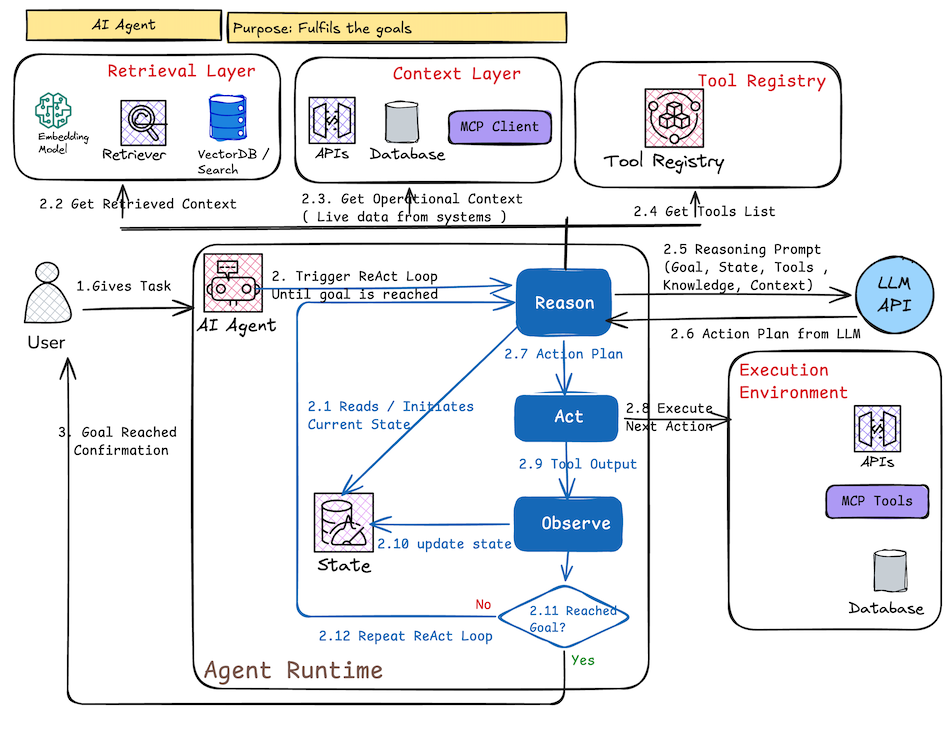
Core loop (ReAct pattern):
- Reason: LLM plans next step given current state, goal, retrieved context, tools list
- Act: Calls tools / APIs from Tool Registry → executes in real environment
- Observe: Gets output / new state (success, error, new data)
- Update state → repeat until goal check = yes
Strengths and Limitations
Aspect | Strengths | Limitations |
Autonomy | Fully goal-directed; runs unattended | Risk of compounding errors or infinite loops |
Flexibility | Handles multi-step, dynamic workflows | Requires robust error handling & recovery logic |
Efficiency | Executes tasks end-to-end without human wait | Higher cost (multiple LLM calls + tool usage) |
Reliability | Can self-correct via observation & re-planning | Still prone to hallucinated plans or tool misuse |
Use Cases | Automation scripts, research agents, data pipelines, monitoring & remediation bots | Not yet trusted for high-stakes decisions without oversight |
While single agents can complete complex workflows, they still struggle with large, interdisciplinary problems. That’s where multi-agent orchestration enters
Stage 6: Agentic Orchestrators & Multi-Agent Systems
The final stage: full agentic orchestration.
A supervisor agent decomposes goals, plans tasks, dispatches them to specialized agents, collects results, updates global state, and repeats until the objective is achieved. This is the pattern powering complex, long-running, collaborative AI workflows in 2026.
How it works (diagram explanation):
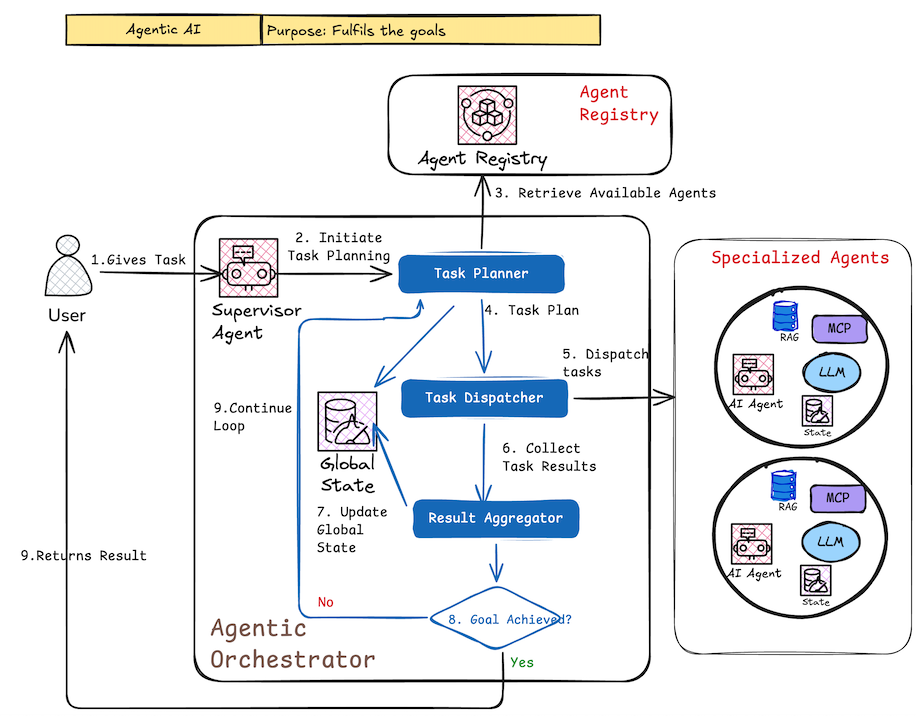
Core components & flow:
- User gives high-level task/goal
- Supervisor Agent triggers planning
- Task Planner creates breakdown → Task Dispatcher assigns to specialized agents (from Agent Registry)
- Each specialized agent runs its own ReAct-style loop (retrieve context, use tools, act, observe)
- Results flow back → Result Aggregator combines them
- Global State updated (database)
- Supervisor checks: goal reached? → Yes → return result; No → replan & repeat
Strengths and Limitations
Aspect | Strengths | Limitations |
Complexity Handling | Solves multi-step, interdependent, long-horizon tasks | Very high implementation & debugging complexity |
Scalability | Parallel execution across specialized agents | Coordination overhead, potential for cascading failures |
Specialization | Agents optimized for narrow domains (researcher, coder, analyst, etc.) | Requires well-defined agent roles & handoff protocols |
Adaptability | Supervisor re-plans on failure or new info | Risk of goal drift or inefficient loops without strong termination criteria |
Use Cases | End-to-end R&D, supply-chain automation, multi-department workflows, autonomous research teams | Still emerging in production; mostly used with heavy human oversight in 2026 |
In March 2026 this orchestrator pattern represents the current frontier. Early production examples exist in research labs, advanced dev tools, and select enterprise use cases, but reliability, cost control, and observability remain active challenges.
Conclusion
We’ve walked the full spectrum:
- Basic Chatbot → pure generation
- RAG → grounded answers
- Copilot → action suggestions
- Copilot + RAG → grounded suggestions
- Autonomous Agent → ReAct execution loop
- Agentic Orchestrator → goal-directed multi-agent collaboration
Each step adds a new capability layer while increasing complexity, cost, and risk. Most organizations in 2026 are somewhere between stages 2–5; stage 6 is the ambitious target for transformative workflows.
Which stage are you building or deploying right now?
What’s the biggest blocker you’re hitting?
Share in the comments — happy to discuss real-world patterns or dive deeper into any stage in follow-up posts.
Thanks for making it through the whole ladder. I hope the diagrams helped make the progression feel less abstract.
Which stage are you actually wrestling with right now ?